
This is release note of v2.5 of Mass Image Compressor for v2.5. This release makes the app easier to follow from start to finish, and adds lossy compression for PNG files.
Choosing where files are saved is now Step 2
Picking your output location and saving options used to live in the sidebar, where it was easy to miss. It is now a proper second step of its own:
- Pick your images
- Choose where they go, file name change and related settings
- Compress
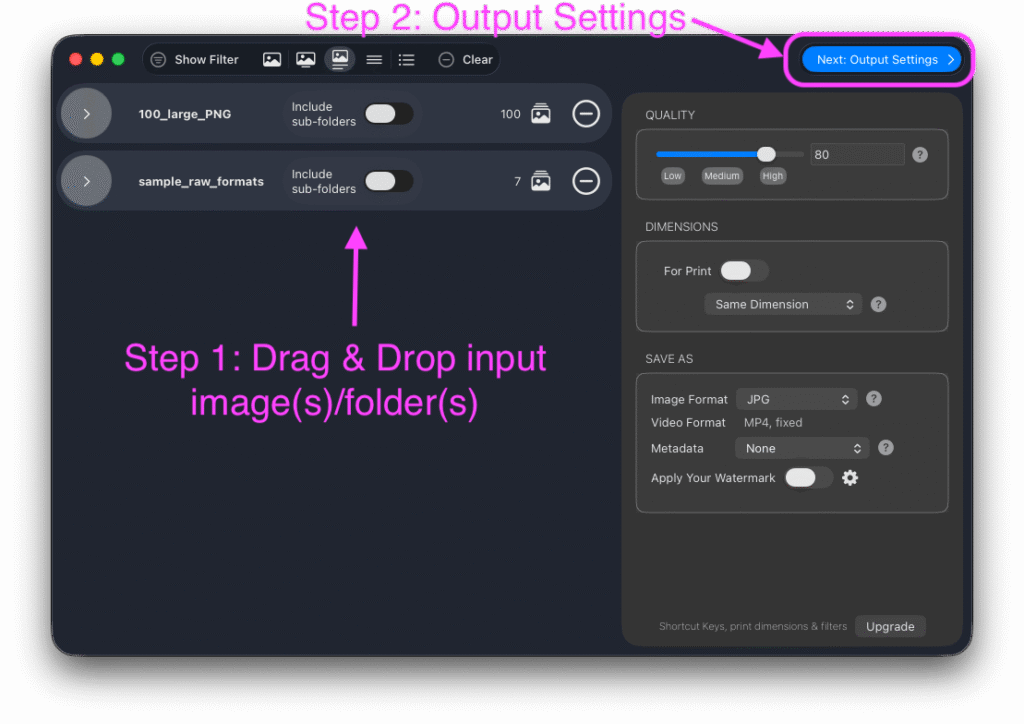
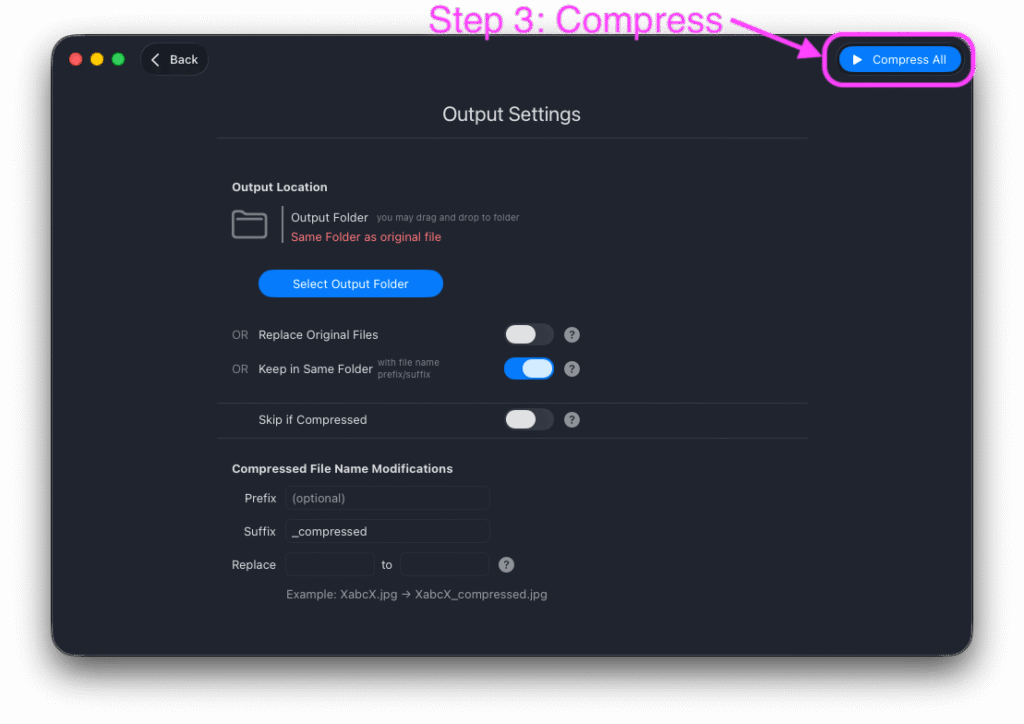
The output screen now shows everything about saving in one place: the destination folder, “Keep in same folder”, “Replace all files”, “Skip files that are already compressed”, and the filename options. Each option has its own short help note, so you can see exactly what will happen before anything is written. The warnings that protect your originals from being overwritten are unchanged and still appear when they should.
Lossy PNG compression with the new “Allow quality loss in PNG” option
PNG files have always been optimized without losing any quality. You can now go further and turn on Allow quality loss in PNG on the quality settings.
When it is on, the app reduces the number of colors in the image so the file size drops considerably. The result looks very similar to the original, but is not pixel-for-pixel identical.
- Great for screenshots, logos, sketches, icons, charts, and web graphics.
- Not recommended for photographs.
- Animated PNGs are left untouched.
- The quality slider now controls how much loss is allowed. The app checks the result against the quality you asked for and keeps the lossless version whenever the lossy one would not meet it, so you are never handed a worse-looking image than you asked for.
This option is available with any subscription or one-time purchase.
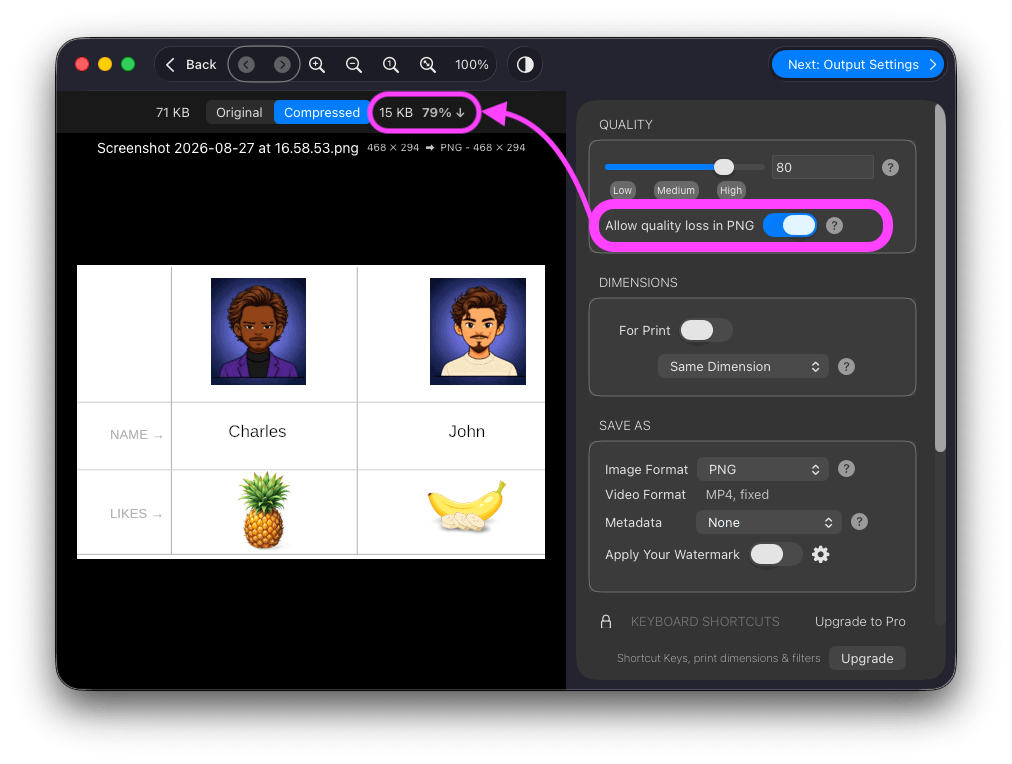
PNG Lossy Compressor Performance
- All three screenshots used in this release notes are compressed with the new option to compress PNG. The size is reduced anywhere from 70 to 80% as there is no complex colorful image in it.
- Another example is the image compressed in above example. Below are original and compressed images. Try to find which is original and which is compressed (79% smaller).
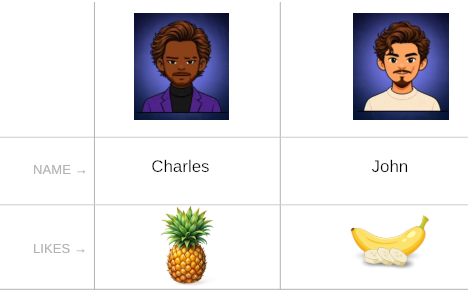
One of above is compressed by Mass Image Compressor v2.5
Faster, smoother gallery
- Loading a large batch of images into the gallery is now about 3.5x faster.
- Thumbnail memory use is capped, which fixes the interface freezing after the app had been left idle or after using “Open With”.
- New users now see thumbnails with more details by default, so it is clearer what each file is.
Fixes and smaller improvements
- Fixed: TIFF files processed with “Don’t Change” were being saved as .jpeg instead of staying .tif (‘.tiff’ worked fine).
- Fixed: a rare failure when the output path could not be determined.
- Tidier toolbar: better placement, appearance, and consistent button spacing.
- Corrected spelling and alignment in several help texts and in the “Don’t Change” option.
- Removed the AI help-bot link from the app.
Credits
The new PNG color reduction is built on these open source projects, and we are grateful to their authors:
- Exoquant by Dennis Ranke (MIT) – the color quantization that makes lossy PNG compression possible.
- ssimulacra2 by the rav1e contributors (BSD 2-Clause) – the image quality check that decides whether a quantized PNG is good enough to keep.
- oxipng – continues to power the existing lossless PNG optimization.
Full license texts are available in the app under Third Party Licenses.
Leave a Reply